
An app instead of the terminal for AI agents — comfy as pajamas.
Claude Code, Codex, Copilot, Cursor and more agents in one window, across several projects at once: 15 in tabs, 40+ in chat. See who is waiting for you, how much limit is left, and what to do when something goes wrong.
Mac with Apple chip and Windows 10/11 · works with your subscriptions and keys · free during the beta
Same agent. A whole different view
The real agents inside — Claude Code, Codex and more — and everything the terminal is missing around them. Flip the switch and compare.
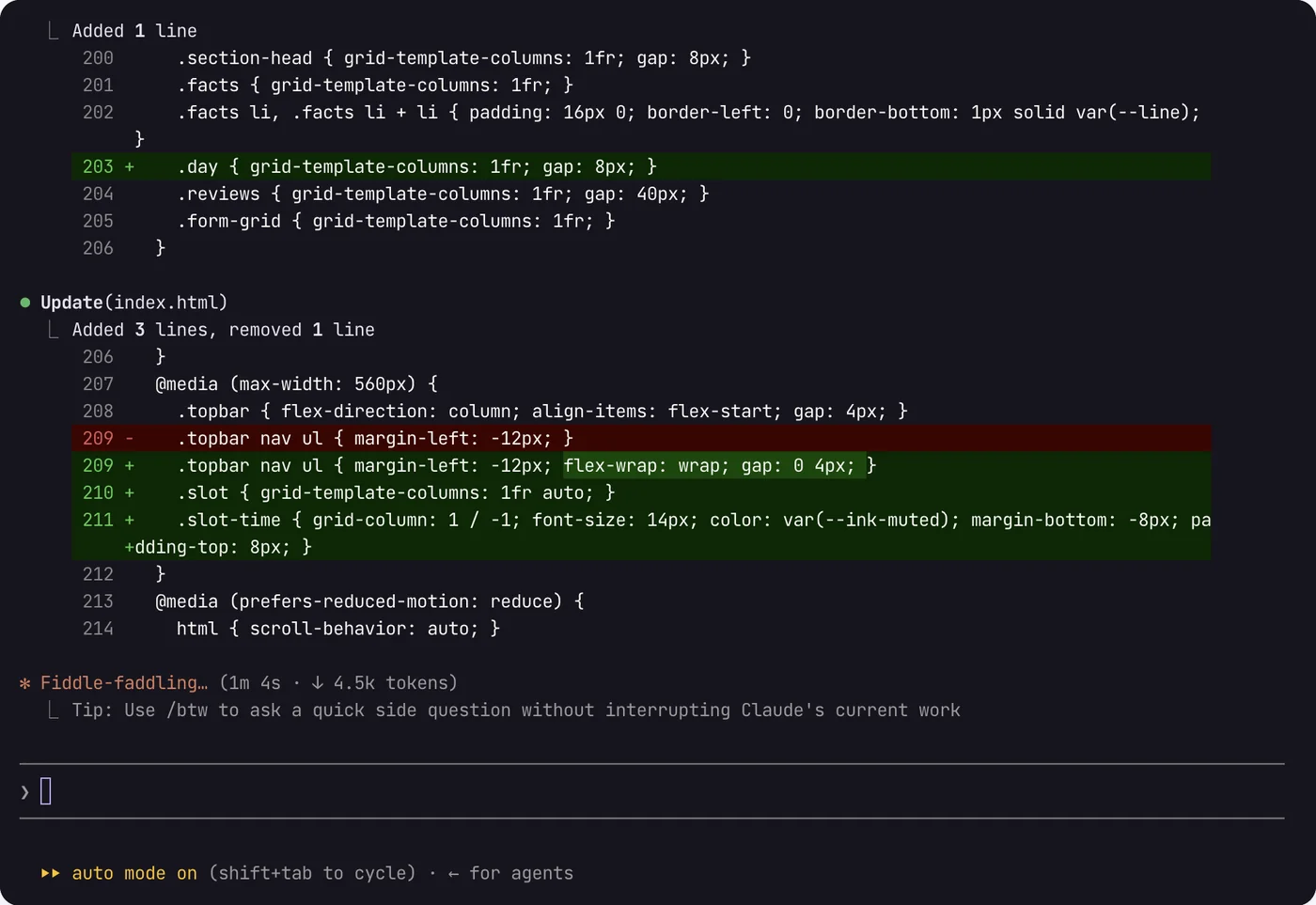
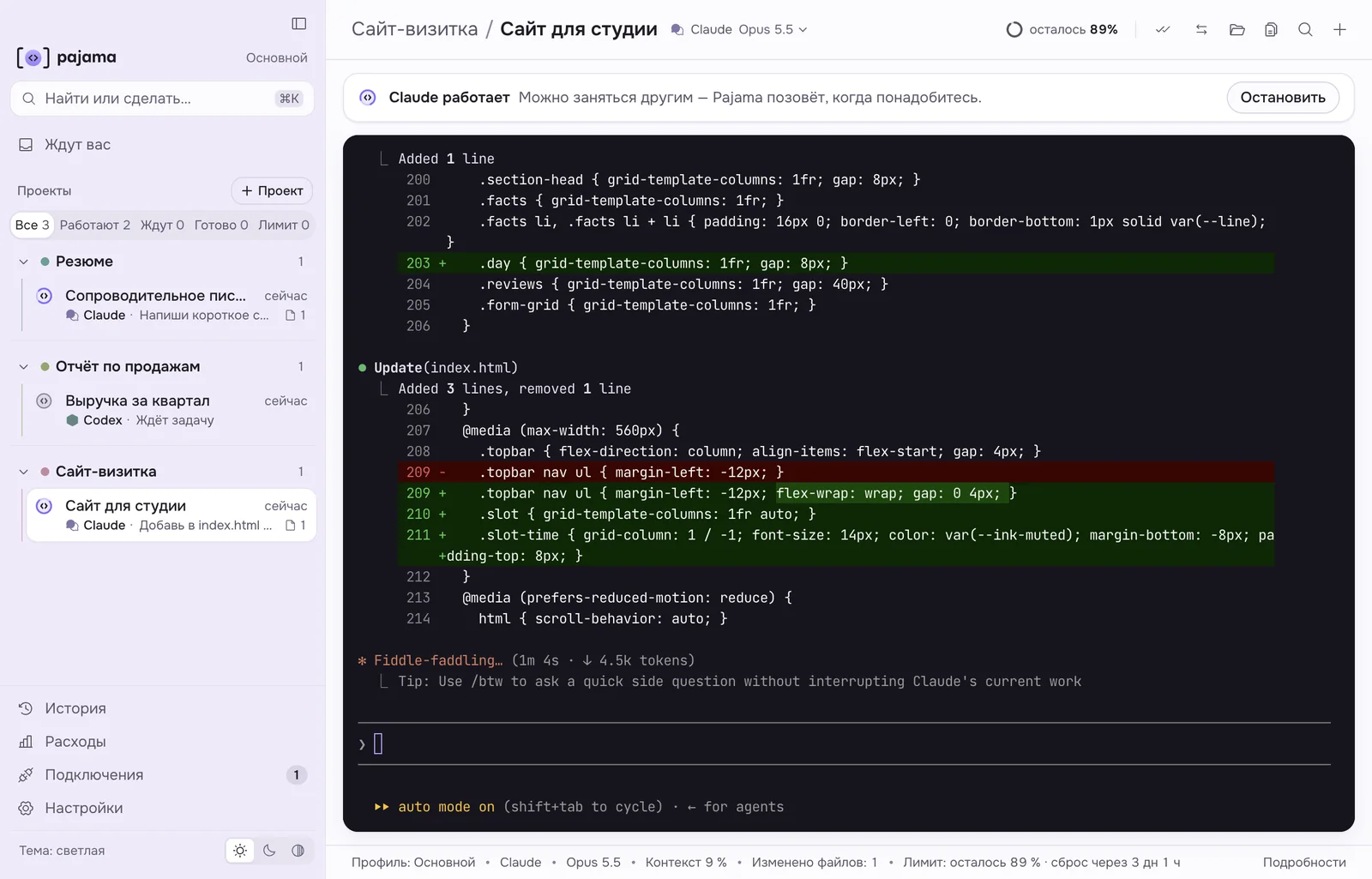
- Which session is waiting for you?
- How much of your limit is left?
- What if the agent gets stuck?
Same agent — but everything beyond the current chat lives in your head.
- 1Waiting for youEvery agent question in one place — ⌘J.
- 2Status of every sessionWorking, waiting, done or out of limit — shown by the icon.
- 3Plain-language statusA bar above the terminal says what the agent is doing.
- 4Limit leftWhat’s left and when it resets, right in the header.
- 5Second opinionSend Claude’s work to Codex for review with one click.
Not one agent — a whole team
Claude Code, Codex and 13 more agents run in tabs — the real terminal inside, a friendly interface around it: statuses, limits, permissions as buttons. 40+ more agents run in a simple chat window. Build your own helpers, grab ready ones from the marketplace, and let Pajama handle the queue, hand-offs and reviews.
Run any agent
Claude Code, Codex, GitHub Copilot, OpenCode, Cursor, Kimi Code, Qwen Code, Gemini CLI and more — 15 agents run in Pajama tabs, several sessions at once. 40+ more run in a simple chat window via ACP.
- 15 in tabs
- 40+ in chat (ACP)
- statuses and history where supported
Build your own agents
In Helper team, create your own: a role, a model, which tools they may use. Group them into teams and show who hands work to whom — Claude calls the right one.
- code-reviewer
- designer
- tester
- Claude Code
Agent and extension marketplace
Skills, helpers and plugins from the Anthropic catalog, skills.sh and GitHub. Before you install, Pajama shows what’s inside and how safe it is.
- Skills
- Helpers
- Plugins
Automation: tasks move on their own
A task starts after the limit resets and moves to another agent when a limit runs out. Codex, Copilot, Cursor, Kilo and others review the work read-only; if the reviewer is out of limit, Pajama waits for the reset. Once a day — a project report.
- Queue
- Hand-off
- Cross-review
- Scheduled report
One kit for the whole team
Bundle your helpers, skills and rules into a versioned kit. Teammates connect it from a shared folder or a repo and work by the same rules.
- v1.3
- git
- Dropbox
- Claude Code
Your data stays with you
Projects, chat history and settings live on your computer, not in a Pajama cloud. A service got blocked or you ran out of credit? Connect another model or agent and carry on from the same spot.
- On your disk
- Any provider
- No lock-in
Everything Pajama does
All of this already works in version 0.6.6. Pick a section on the orbit — its features appear beside it. Claude Code–only and Pro features are marked.

Every agent in one window 8 features
Every folder and agent session in one window — no hunting for the right terminal.
Each session shows a badge: working, waiting for you, done or out of limit — for agents that support it.
Questions and permission requests from every agent in one list — open it with ⌘J.
Pajama calls you when an agent finishes or needs a decision, even when minimized.
How many sessions are waiting for you shows on the icon in the menu bar or tray, even when the window is minimized.
Return to a past session or continue the last one — wherever the agent keeps history.
Drag projects and sessions in the sidebar; the order is remembered. From the keyboard — “Move up / down” in the menu.
Command palette: a new session, a project, the right screen — find it by a word.
Agents and models 10 features
Beta. The agent runs on a server you rent, even when your computer is off, and Pajama reconnects when you’re back. It installs Node.js, the agents and everything else they need on the server for you. You rent and pay for the server directly with the provider.
A helper, skills and rules for a typical task — a one-page site, a site launch, a presentation — go into a project in one click. Files you edited yourself are never touched.
40+ agents from the open ACP registry: Pajama downloads the agent, helps you sign in and asks permission with buttons.
Claude Code on DeepSeek, GLM, Kimi, MiniMax, Qwen, OpenRouter, local Ollama or your own endpoint. Switch models right in the session header.
International sign-in via kimi.ai, “Ask”, “Auto” and “No questions” modes, and the remaining limit in the header.
Out of Claude limit? Codex continues right where you stopped. And vice versa.
Skills and helpers with GitHub search, checked before install. MCP services carry over from Claude to other agents.
A skill both Claude and Codex need lives in a single folder: edit it for one and it changes for both.
Services, skills and helpers in one list: switch on what you need, off what you don’t. See what works and what’s broken.
Several Claude subscriptions, each with its own settings.
Limits and money 5 features
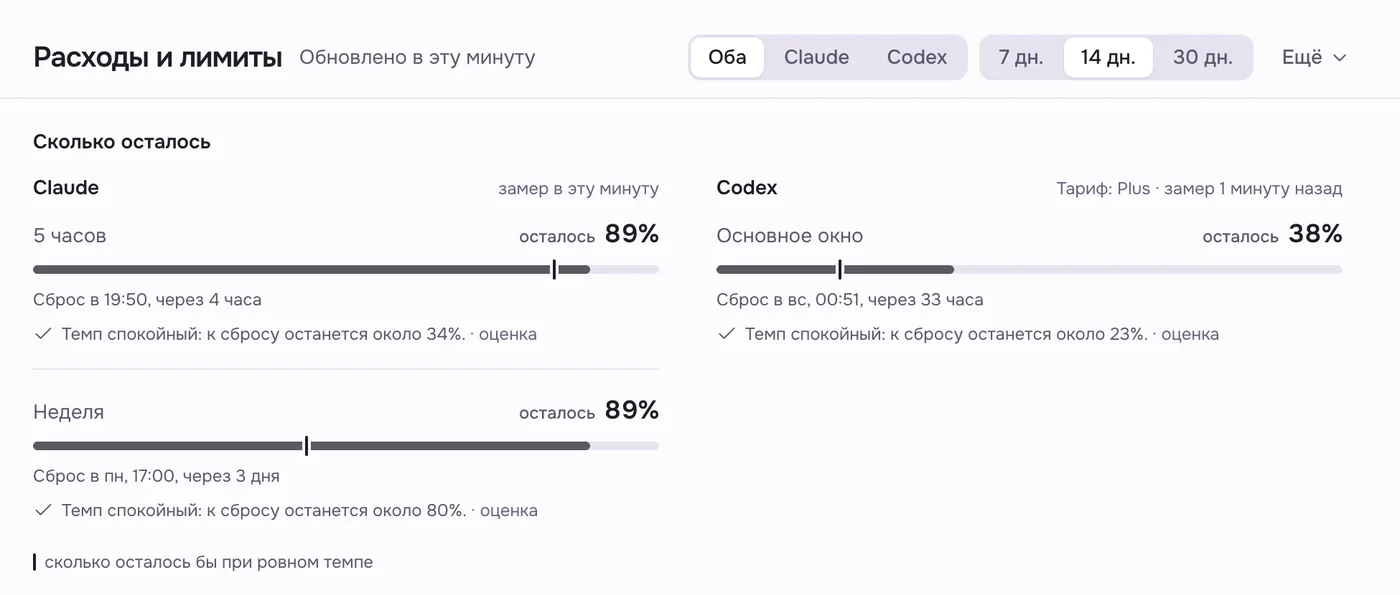
What’s left, when it resets and whether it lasts at this pace — for Claude, Codex and Kimi Code.
Cost at API prices, model comparison and a forecast — for Claude, Codex, Copilot, OpenCode, Kimi Code, Qwen Code, Cline and terminal-free chats.
For a simple task Pajama suggests a cheaper model. You can turn the hint off in settings.
Queue a task and it starts on its own after the reset. Pajama needs to stay open.
See how much context is used at the bottom of the window, before the agent starts forgetting.
Checks and safety 7 features
Four modes per tab: read only, careful, ask or auto. One click in the header to change.
Each agent request is retold in plain words. An unfamiliar command never looks safe.
Another agent reviews the work — Codex, Copilot, OpenCode, Cursor, Kilo, Qwen Code, Claude or any installed agent that can review. The choice is remembered per project. Reviewers only read — they never edit or run anything.
Passwords and keys live in the system’s secure storage. Pajama uses the network to check for updates and your account sign-in, and for actions you start; usage statistics are sent only with your consent.
Once a day an agent looks at the project: what’s done, what’s risky. Reviewer out of limit? Pajama waits for the reset.
If a Claude session was started under another account, a note above the terminal explains what that means and how to check sign-in.
Finds setting mistakes or why an agent won’t start, checks agent versions and shows the steps.
For first-timers 8 features
Only the essentials on screen: name, permissions, limit. Everything for power users is one checkbox away in settings.
Pajama checks Node.js up front, offers to download it and check again, suggests “Try again” when a download breaks and says honestly how long it takes.
24 how-to articles with a “Go there” button that opens the right screen. Ask for more detail from a model you connected.
Claude Code and Codex install and sign in with one click. The interface speaks six languages.
On Mac: ⌘+ / ⌘− / ⌘0 or a trackpad pinch resizes the terminal text. One size for all tabs.
Speak instead of typing — ⇧⌘Space or the mic button. The text lands in the agent’s input; you send it. Recognition runs on your computer and your voice never leaves it. An add-on of ~600 MB, downloaded from settings.
A new version downloads in the background and installs when you quit or press “Restart and update” — on Windows and on Mac.
Watch Claude tabs and answer the agent from your phone via Remote Control. Requires Pro or Max.
Files and history 6 features
Name the project and Pajama creates its folder in Documents and adds it to the list.
A file, a screenshot or an image from the browser — anywhere in the window or onto a tab, or with the paperclip by the input. The agent gets the path. Pasted the wrong thing? ⌘Z.
Connect any folder to a project — say, your Obsidian notes. Click a file path in the terminal and it opens in the viewer.
Find any past conversation with an agent by a word from it.
For every project: “done, risks, recommendations” reports, the full history of chats and agent edits.
What’s connected to what, on one diagram. Hover a node and Pajama explains what it’s for; hand over a task right from the map.
Four steps to your first task
Install Pajama
It sets up Claude Code, Codex or any of 15 agents for you with one click.
Sign in to your account
You sign in in your browser; Pajama never sees your password. No account yet? Create one right there — it takes a couple of minutes.
Pick a project folder
Open the folder with your work or create a new project right in Pajama — it makes the folder for you.
Hand over a task
Say what you need in plain words.
- Tailor my résumé to this job
- Build a report from this quarter’s spreadsheets
- Make a one-page website from my notes
What you need. A Mac with Apple chip or Windows 10/11 and a subscription or key for at least one agent: say, Claude Pro or Max for Claude Code, ChatGPT Plus or higher for Codex, or a DeepSeek key. Not sure what to pick? Pajama helps.
Download Pajama
Free for personal, non-commercial use. You’ll need a free Pajama account (email sign-in) and a subscription or key for at least one agent — say, Claude Pro or ChatGPT Plus. Pajama helps you sign in.
We’re still getting our Apple and Microsoft certificates. Until then, macOS and Windows warn about any app without that signature — it doesn’t mean anything is wrong with the file. Allowing it takes a couple of clicks, steps below. You can check the file is ours with its checksum.
MacYour system
Apple chip (M1 or later), macOS 13 or later
How to install
- Open the downloaded .dmg and drag Pajama into Applications.
- Open Pajama from Applications. macOS says it can’t verify the app — click Done.
- Open System Settings → Privacy & Security, scroll down and click Open Anyway next to the Pajama line. Enter your Mac password.
- Open Pajama again and click Open. macOS won’t ask again.
If macOS says the app is “damaged”
This happens when the browser marked the file as downloaded from the internet. Open Terminal, paste the command, press Enter, then open Pajama again:
xattr -dr com.apple.quarantine /Applications/Pajama.appSHA-256 checksum
4fd9460b45116d575b4f3d0402d2321f92f624e949dd588d64a67d0dd490203bCheck in Terminal:
shasum -a 256 ~/Downloads/Pajama-0.6.6-arm64.dmgMacs with Intel processors aren’t supported yet.
WindowsbetaYour system
Windows 10 or 11, 64-bit
The Windows version is still in beta. If anything goes wrong, write to us — we’ll fix it fast.
How to install
- If your browser says the file isn’t commonly downloaded or won’t let you download it, open the “…” menu next to the download and choose Keep. If there is no such button, read “Edge won’t let me download Pajama” in the install guide.
- Run the file. In the blue “Windows protected your PC” window, click the small “More info” link (not “Don’t run”), then Run anyway. If that fails: right-click the file → Properties → tick “Unblock” → OK.
- In the installer choose “Only for me” and click Next → Install → Finish.
- Pajama appears in the Start menu and on your desktop.
SHA-256 checksum
d3486bd5f4427524237066eb282a728f10ceba4eb59bccf9952b6cba774adf92Check in PowerShell:
Get-FileHash $HOME\Downloads\Pajama-0.6.6-x64.exeBy downloading and installing Pajama, you accept the license agreement.
New versions
Pajama updates itself on both Windows and Mac: the new version downloads in the background and installs when you quit or press “Restart and update”. If auto-update doesn’t work, download it here. Leave your email and we’ll write when an update is out.
Pricing
0 ₽
Free for personal, non-commercial use. While the beta lasts everything is unlocked, future Pro features included. All you need is a free Pajama account with email sign-in.
Pro
A paid Pro version with extra features is coming. We’ll announce the features and price in advance; the free version stays.